
Microsoft Released Emergency Security Updates; Patches Microsoft Office 0-Day Vulnerability
Microsoft has released emergency out-of-band security updates to patch a high-severity Microsoft Office zero-day vulnerability exploited in attacks. The out-of-band security updates was released on January 26, 2026, to address CVE-2026-21509, a zero-day security feature bypass vulnerability in Microsoft Office that attackers are actively exploiting.
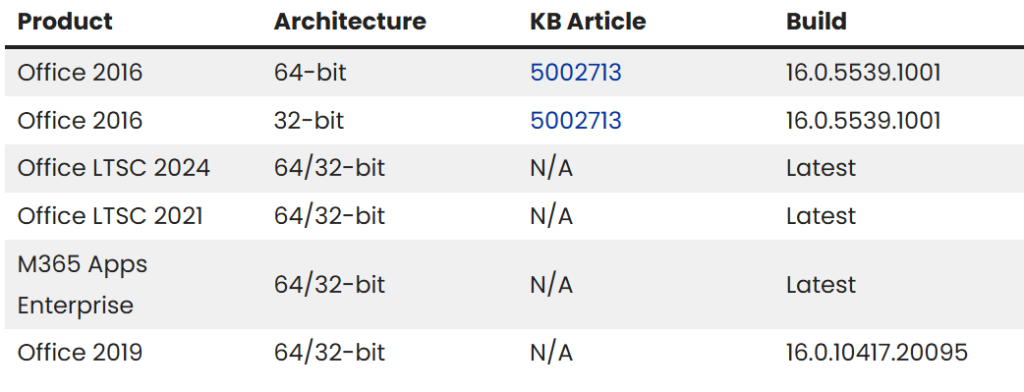
The feature’s bypass vulnerability, tracked as CVE-2026-21509, affects multiple Office versions, including Microsoft Office 2016, Microsoft Office 2019, Microsoft Office LTSC 2021, Microsoft Office LTSC 2024, and Microsoft 365 Apps for Enterprise (the company’s cloud-based subscription service).
Key Pointers
- CVE-2026-21509 enables local attackers to bypass Office protections after tricking users into opening malicious files via phishing methods.
- The attack vector requires low complexity, no privileges, and user interaction, but yields high impacts on confidentiality, integrity, and availability (C:H/I:H/A:H).
- Microsoft Threat Intelligence Center (MSTIC) confirmed exploitation detection, marking it as the second actively exploited zero-day patched this month after Patch Tuesday’s updates.
As per Microsoft reliance on untrusted inputs in a security decision in Microsoft Office allows an unauthorized attacker to bypass a security feature locally. An attacker must send a user a malicious Office file and convince them to open it.
The affected products impacts legacy and current Office editions
Key Recommendations from Microsoft
Organizations should prioritize patching, enable auto-updates, and monitor phishing IOCs like suspicious Office attachments. Threat actors favor this vector for ransomware/APT initial access; deploy EDR for COM/OLE anomalies. No public PoCs or actors named yet, but watch CISA KEV for additions.
- Close all Microsoft Office applications.
- Creating back up of windows registry as incorrectly editing, can cause issues with the operating system.
- Open the Windows Registry Editor (regedit.exe) by clicking on the Start menu and typing regedit, and then pressing Enter when it appears in the search results.
- When open, use the address bar at the top to see if one of the following Registry keys exists:
HKEY_LOCAL_MACHINE\SOFTWARE\Microsoft\Office\16.0\Common\COM Compatibility\ (for 64-bit Office, or 32-bit Office on 32-bit Windows) HKEY_LOCAL_MACHINE\SOFTWARE\WOW6432Node\Microsoft\Office\16.0\Common\COM Compatibility\ (for 32-bit Office on 64-bit Windows) HKEY_LOCAL_MACHINE\SOFTWARE\Microsoft\Office\ClickToRun\REGISTRY\MACHINE\Software\Microsoft\Office\16.0\Common\COM Compatibility\ HKEY_LOCAL_MACHINE\SOFTWARE\Microsoft\Office\ClickToRun\REGISTRY\MACHINE\Software\WOW6432Node\Microsoft\Office\16.0\Common\COM Compatibility\
If one of the above keys does not exist, create a new “COM Compatibility” key under this Registry path by right-clicking on Common and selecting New -> Key.HKEY_LOCAL_MACHINE\SOFTWARE\Microsoft\Office\16.0\Common\
- Now right-click on the existing or newly created COM Compatibility key and select New -> Key and name it {EAB22AC3-30C1-11CF-A7EB-0000C05BAE0B}.
- When the new {EAB22AC3-30C1-11CF-A7EB-0000C05BAE0B} is created, right-click on it, select New -> DWORD (32-bit) Value. Name the new value Compatibility Flags.
- When the Compatibility Flags value is created, double-click on it, make sure the Base option is set to Hexadecimal, and enter 400 in the Value data field.
Source: https://www.bleepingcomputer.com/news/microsoft/microsoft-patches-actively-exploited-office-zero-day-vulnerability/