Intrucept

Windows 11 DLL Flaws Open Doors to Privilege Escalation! 

Summary 

Security researcher John Ostrowski of Compass Security has uncovered two privilege escalation vulnerabilities in Microsoft Windows CVE-2025-24076 and CVE-2025-24994.

DLL hijacking is a technique that exploits how Windows applications load DLLs.

OEM Windows 
Severity HIGH 
CVSS Score 7.3 
CVEs CVE-2025-24994, CVE-2025-24076 
No. of Vulnerabilities Patched 02 
Actively Exploited Yes 
Exploited in Wild Yes 
Advisory Version 1.0 

Overview 

These flaws, found in the Mobile Devices management component, stem from insecure DLL loading behavior that could allow unprivileged users to escalate privileges to SYSTEM via a DLL hijacking attack. Microsoft has released fixes for both vulnerabilities as part of its March 2025 Patch Tuesday rollout. 

Vulnerability Name CVE ID Product Affected Severity CVSS Score 
​Windows Cross Device Service Elevation of Privilege Vulnerability  CVE-2025-24076 Windows  HIGH  7.3 
​Windows Cross Device Service Elevation of Privilege Vulnerability CVE-2025-24994 Windows HIGH 7.3 

Technical Summary 

The vulnerability arises due to Windows 11’s “Mobile devices” functionality loading a DLL from a user-writable location without verifying its signature. This enables unprivileged users to replace the DLL with a malicious proxy that executes with elevated privileges. 

CVE ID System Affected Vulnerability Details Impact 
  CVE-2025-24076  Windows 11 Version 22H2, 22H3, 23H2, 24H2.  Exploits a race condition in the “Mobile devices” feature via DLL hijacking. The system process loads CrossDevice.Streaming.Source.dll from a user-writable directory (%PROGRAMDATA%\CrossDevice\), allowing privilege escalation when replaced with a malicious DLL. Attackers used Opportunistic Locks and API hooking (via Detours) to reliably exploit the narrow timing window.   Allows SYSTEM-level privilege escalation 
CVE-2025-24994 Windows 11 Version 22H2, 22H3, 23H2, 24H2 Involves a similar DLL hijacking flaw in a user-to-user context. A user-level process loads a DLL without signature validation, allowing a malicious DLL to be executed under another user’s context. This vector is less severe but still exploitable.  Allows user-to-user privilege escalation 

Remediation

  • Implement Security Updates to make sure to install the current security patches made available by Microsoft, specifically March 2025 updates, into affected systems. 
  • Turn off Cross Device Service if not needed, disable the “Mobile Devices” feature in Windows 11 to avoid exploitation of the vulnerabilities. 
  • Look for Suspicious Activity constantly scan system logs for suspect activity, particularly attempts to alter or load DLL files in protected processes. 
  • Restrict User Permissions prevent non-administrative users from changing system files or running processes with elevated privileges. 
  • Support DLL Signature Verification makes all programs support DLL signature verification so that no applications can load unsigned or altered DLL files. 

Conclusion: 
The discovered DLL hijacking vulnerabilities in Windows 11’s “Mobile devices” feature demonstrate how legacy attack techniques remain potent when integrated into new OS functionalities.

The presence of a working Proof-of-Concept (PoC) reinforces the practical risk posed by these flaws. Organizations should immediately apply the March 2025 security updates and consider employing EDR solutions to monitor for related behavior. Continued vigilance and file access control hardening remain essential in defending against such privilege escalation attacks.  

While CVE-2025-24076 enables SYSTEM-level access but CVE-2025-24994 arises from a related user-level process failing to validate DLLs.

This opens the door to user-to-user attacks, though its impact is far less severe compared to its SYSTEM-targeting sibling.

References


Critical Session Management Vulnerability in Apache Roller 

Summary Security Advisory

Apache Roller, a widely used Java-based blogging platform, enabling users to create, manage, and publish blog content. It supports features like user authentication, content management, and customizable themes.

OEM Apache 
Severity Critical 
CVSS Score 10.0 
CVEs CVE-2025-24859 
Actively Exploited No 
Exploited in Wild No 
Advisory Version 1.0 

A critical security vulnerability (CVE-2025-24859) has been discovered in Apache Roller (versions 1.0.0 to 6.1.4), where old sessions are not invalidated after a password change, allowing attackers to maintain unauthorized access if they have stolen a session token. This flaw poses a significant risk of session hijacking and unauthorized access, and users are advised to upgrade to version 6.1.5 to mitigate the issue. 

Vulnerability Name CVE ID Product Affected Severity 
Insufficient Session Expiration on Password Change CVE-2025-24859 Apache Roller Critical 

Technical Summary 

The vulnerability centers on insufficient session expiration.

When a user or administrator changes a password, Apache Roller versions before 6.1.5 do not properly invalidate existing sessions.

As a result, any session tokens  before the password change remain valid.

This means that if an attacker has already compromised a user’s credentials and established a session, they can continue to access the application even after the password is updated, effectively bypassing a key security control.

This can be a big security threat, particularly in systems used by many users or administrators, where it’s important to keep sessions secure. 

CVE ID System Affected Vulnerability Details Impact 
 CVE-2025-24859  Apache Roller 1.0.0 – 6.1.4 Sessions are not invalidated after password change, allowing persistent access through old sessions if compromised.  Unauthorized Access /  Session Hijacking 

Remediation

  • Apply Patches Promptly: Upgrade immediately to Apache Roller version 6.1.5, which implements proper centralized session invalidation. 

Conclusion: 

CVE-2025-24859 represents a critical access control threat to Apache Roller implementations.

Although no active exploitation has been observed still now, it’s easy for attackers to misuse sessions if they gain access. Its important for organizations using Apache Roller to quickly update to version 6.1.5 to fix this problem. 

This is a critical step in maintaining the security of blog sites and protecting user data.

CVE-2025-24859 highlights the importance of robust session management in web applications.

References

Dell Releases Patches for Multiple PowerScale OneFS Security Vulnerabilities 

Summary 

Dell Technologies Security Advisory

OEM Dell 
Severity Critical 
CVSS 9.8 
CVEs CVE-2025-27690, CVE-2025- 26330, CVE-2025-22471 
Exploited in Wild No 
Patch/Remediation Available Yes 
Advisory Version 1.0 

Overview 

​Dell Technologies has released security updates addressing multiple vulnerabilities of varying severity in its PowerScale OneFS operating system.

These vulnerabilities could be exploited by attackers to gain control of high-privilege accounts, bypass security mechanisms, or disrupt system functionality. Dell has issued patches for several of these issues, a summary of some key vulnerabilities is provided in the table below. 

Vulnerability Name CVE ID Product Affected Severity 
Default Password Vulnerability CVE-2025-27690 PowerScale OneFS   Critical 
Incorrect Authorization Vulnerability CVE-2025-26330 PowerScale OneFS   High 
Integer Overflow or Wraparound Vulnerability CVE-2025-22471 PowerScale OneFS  Medium 

Technical Summary 

CVE ID System Affected Vulnerability Details Impact Affected Version 
CVE-2025-27690 PowerScale OneFS Dell PowerScale OneFS multiple versions contain a default password vulnerability where an unauthenticated remote attacker could potentially exploit this vulnerability, leading to the privilege escalation. Gain Privileges or Assume Identity  Versions 9.5.0.0 through 9.10.1.0 
CVE-2025-26330 PowerScale OneFS Dell PowerScale OneFS multiple versions contain an incorrect authorization vulnerability where unauthenticated local attacker could potentially exploit this vulnerability to access the cluster with previous privileges of a disabled user account. Unauthorized Access Versions 9.4.0.0 through 9.10.0.1 
CVE-2025-22471 PowerScale OneFS Dell PowerScale OneFS multiple versions contain an integer overflow or wraparound vulnerability where an unauthenticated remote attacker exploits this which leads to denial of service. Service unavailable Versions 9.4.0.0 through 9.10.0.1 

Remediation

It has been recommended to upgrade to the following versions to address the security risks 

OneFS Version Updated Version 
9.10.x.x 9.10.1.1 
9.9.x.x 9.9.0.2 
9.8.x.x 9.8.0.3 
9.7.x.x 9.7.1.7 
9.5.x.x 9.5.1.3 

Workaround for CVE-2025-27690 

It’s always recommended to update to the latest version. If you’re unable to upgrade immediately, you can follow the workarounds provided by the vendor from here

References: 

Critical Flaw in FortiSwitch of Fortinet Allows Attackers to Change Admin Password

An unverified password change vulnerability [CWE-620] in FortiSwitch GUI discovered.

This may allow a remote unauthenticated attacker to modify admin passwords via a specially crafted request as per Fortinet advisory released.

Summary

OEMFortinet 
SeverityCRITICAL
CVSS Score9.8
CVEsCVE-2024-48887
Actively ExploitedYes
Exploited in WildYes
Advisory Version1.0

Overview

Fortinet’s FortiSwitch product line has revealed a significant vulnerability noted as CVE-2024-48887. This flaw allows unauthenticated remote attackers to change administrative passwords by sending specially crafted requests to the device’s password management endpoint. With a CVSS score of 9.8, the vulnerability is classified as Critical and is actively being exploited in the wild.

Vulnerability NameCVE IDProduct AffectedSeverityCVSS Score
A unverified password change vulnerability  CVE-2024-48887Fortinet   CRITICAL  9.8

Technical Summary

A critical vulnerability (CVE-2024-48887) has been identified in Fortinet FortiSwitch devices, affecting versions 6.4.0 through 7.6.0. This flaw resides in the web-based management interface and allows remote, unauthenticated attackers to change administrator passwords by sending a specially crafted HTTP request to the set_password endpoint.

CVE IDSystem AffectedVulnerability DetailsImpact
    CVE-2024-48887  FortiSwitch v7.6, 7.4, 7.2, 7.0, 6.4CVE-2024-48887 is an unauthenticated password change vulnerability in FortiSwitch web GUI.
It enables remote unauthenticated attackers to modify admin passwords through crafted requests to the set_password endpoint.
    Unverified Password Change

Remediation:

  • Apply Security Patches: Install the latest security update for your FortiSwitch version. Fortinet has fixed the issue in 6.4.15 and above,7.0.11 and above,7.2.9 and above,7.4.5 and above,7.6.1 and above versions.

General Recommendations

  • Update Devices Regularly always install the latest firmware and security patches from Fortinet to fix known vulnerabilities.
  • Limit access to the FortiSwitch web GUI to trusted IP addresses and disable HTTP/HTTPS access if it is not required.
  • Set strong and unique passwords and change them regularly to prevent unauthorized access.
  • Monitor unusual Activity for suspicious logins or configuration changes.

Conclusion:


The CVE-2024-48887 vulnerability poses a serious security risk to organizations using affected FortiSwitch devices. Its ease of exploitation and the lack of authentication required make it particularly dangerous.

Organizations must act immediately by applying the relevant security patches, limiting administrative access, and monitoring for unusual activity.

References:

WordPress Ultimate CSV Importer Flaws Put 20,000+ Sites at Risk

Threat researchers discovered an arbitrary File Upload vulnerability and an Arbitrary File Deletion vulnerability within the WP Ultimate CSV Importer plugin. This is affecting versions 7.19 and earlier.

The vulnerabilities have been addressed in version 7.19.1 of the plugin.

Summary 

OEM WordPress 
Severity High 
CVSS Score 8.8 
CVEs CVE-2025-2008, CVE- 2025-2007 
Actively Exploited Yes 
Exploited in Wild Yes 
Advisory Version 1.0 

Overview 

The security flaw WordPress plugin, Ultimate CSV Importer, affecting over 20,000 websites. The vulnerabilities, identified as CVE-2025-2008 and CVE-2025-2007, can lead to catastrophic consequences, including complete site compromise. 

Vulnerability Name CVE ID Product Affected Severity CVSS Score 
Arbitrary File Upload  CVE-2025-2008 WordPress  High  8.8 
Arbitrary File Deletion  CVE-2025-2007 WordPress  High  8.1 

Technical Summary 

A critical security vulnerability has been discovered in the WP Ultimate CSV Importer plugin (versions ≤ v7.19). This flaw allows attackers with only Subscriber level access to exploit the system in two dangerous ways: 

  1. Malicious File Upload: Attackers can upload malicious files, potentially enabling remote code execution and granting full control over the affected site. This allows for complete site compromise, including the ability to install backdoors or steal sensitive information. 
  1. Critical File Deletion: Attackers can delete crucial files, such as wp-config.php, which can reset the WordPress site and give attackers the ability to take full control over the site. 
CVE ID System Affected Vulnerability Details Impact 
  CVE-2025-2008  WP Ultimate CSV Importer plugin (versions ≤ 7.19) A critical flaw in the WP Ultimate CSV Importer plugin (≤ v7.19) allows attackers with Subscriber access to upload malicious files due to improper file type validation.
This can lead to remote code execution (RCE) and full site takeover. 
  Remote code execution (RCE) 
 CVE-2025-2007 WP Ultimate CSV Importer plugin (versions ≤ 7.19) A serious flaw in the WP Ultimate CSV Importer plugin (≤ v7.19) allows attackers with Subscriber access to delete critical files, like wp-config.php, due to weak file path validation.
This can reset the site, letting attackers take control. 
 Arbitrary file deletion leading to site reset 

Remediation

Install version 7.19.1 or later to fix the security flaws. Keeping all plugins and WordPress updated helps prevent attacks. 

General Recommendations 

  • Update the Plugin – Install the latest version (7.19.1+) to fix security issues and keep your site safe. 
  • Limit User Access – Allow only trusted users to upload or delete files to prevent hackers from exploiting vulnerabilities. 
  • Use Security Plugins – Install tools to block threats, monitor activity, and protect your site. 
  • Backup Your Website – Regularly save backups so you can restore your site if it gets hacked or files are deleted. 

Conclusion: 

A major security issue in a popular WordPress plugin put over 20,000 websites at risk of being taken over by hackers.

Attackers could upload harmful files or delete important ones, making websites vulnerable. This incident shows why keeping plugins updated, limiting user access, and using security tools is crucial. Updating to version 7.19.1 is necessary to stay protected. 

References

3 Zero-Day Vulnerabilities backported & fixed in Apple Devices

Summary 

3 Zero-Day Vulnerabilities backported & fixed in Apple Devices

Apple backported fixes for three vulnerabilities that have come under active exploitation in the wild to older models and previous versions of the operating systems.

OEM Apple 
Severity High 
CVSS Score 8.8 
CVEs CVE-2025-24201, CVE-2025-24085, and CVE-2025-24200. 
No. of Vulnerabilities Patched 03 
Actively Exploited Yes 
Exploited in Wild Yes 
Advisory Version 1.0 

Overview 

Apple has released an urgent security advisory concerning three zero-day vulnerabilities currently being actively exploited: CVE-2025-24200, CVE-2025-24201, and CVE-2025-24085. These vulnerabilities affect a range of Apple devices, such as iPhones, iPads, Macs, and other platforms. Users are strongly urged to update to the latest patched versions to reduce security risks. 

Vulnerability Name CVE ID Product Affected Severity CVSS Score 
WebKit Out-of-Bounds Write Vulnerability  CVE-2025-24201 iOS, macOS, visionOS, Safari  High  8.8 
Use-After-Free Vulnerability  CVE-2025-24085 iOS, iPasOS, macOS, watchOS, tvOS  High  7.8 
Incorrect Authorization Vulnerability  CVE-2025-24200  iOS, iPadOS  Medium  6.1 

Technical Summary 

Apple’s latest security update patches three Zero-Day vulnerabilities that hackers were actively exploiting. These vulnerabilities could allow attackers to bypass security protections, making devices more vulnerable. One of the vulnerabilities enables remote code execution, letting attackers run malicious programs. Another flaw allows privilege escalation, giving attackers higher-level access to system functions. 

CVE ID System Affected Vulnerability Details Impact 
  CVE-2025-24201  iOS 18.3.2, iPadOS 18.3.2, macOS Sequoia 15.3.2, visionOS 2.3.2, Safari 18.3  Out-of-bounds write issue allowing malicious websites to escape the Web Content sandbox   Remote Code Execution 
 CVE-2025-24085 iOS 18.3, iPadOS 18.3, macOS Sequoia 15.3, watchOS 11.3, tvOS 18.3, visionOS 2.3 Use-after-free vulnerability in CoreMedia allowing privilege escalation via malicious apps.  Privilege escalation via CoreMedia 
 CVE-2025-24200  iOS 18.3.1, iPadOS 18.3.1, iPadOS 17.7.5 (iPhone XS and later, iPad Pro 13-inch, iPad Pro 12.9-inch, etc.) Authorization bypass vulnerability allowing attackers to disable USB Restricted Mode on locked devices.  Security Bypass USB Restricted Mode 

Remediation

Apply Patches Promptly: Apple has released security updates to address these vulnerabilities. Users should update their devices immediately to mitigate risks 

  • iPhones and iPads: Update to iOS 18.3/iPadOS 18.3 or later. 
  • Macs: Install macOS Sequoia 15.3 or later. 
  • Apple Watch: Upgrade to watchOS 11.3. 
  • Apple TV: Apply tvOS 18.3 updates. 
  • Vision Pro: Install visionOS 2.3 updates. 

General Recommendations: 

  • Prioritize Zero-Day Fixes: Focus on patching actively exploited vulnerabilities, especially those affecting USB Restricted Mode, WebKit, and CoreMedia.  
  • Enable Lockdown Mode: On supported devices, Lockdown Mode can provide additional security against targeted attacks.  
  • Be Cautious with USB Devices: Avoid connecting untrusted accessories to Apple devices to mitigate USB-based attack vectors. 
  • Stay Alert for Malicious Websites: Since WebKit vulnerabilities are actively exploited, avoid suspicious links and untrusted web content. 
  • Monitor for Exploitation: Continuously monitor systems for any signs of exploitation or suspicious activity. 

Conclusion: 

The discovery and active exploitation of these zero-day vulnerabilities underscore the increasing sophistication of cyberattacks targeting Apple’s ecosystem.

While Apple has responded swiftly with patches, users must remain vigilant by keeping their devices updated and adhering to cybersecurity best practices, such as avoiding untrusted applications and enabling Lockdown Mode where applicable. 

Apple fixed all the vulnerability with improved state management.

References


Android Malware Crocodilus; Threat for cryptocurrency wallet Users

Crocodilus is a new banking malware that evades detection from Google’s play protect.

The Android malware has been specifically targeting to steal sensitive cryptocurrency wallet credentials through social engineering. Its convincing overlay screen warns users to back up their wallet key within 12 hours or risk losing access says security researchers.

Why threat researchers call this trojan ?

Crocodilus includes all the necessary features of modern banking malware: overlay attacks, keylogging, remote access, and “hidden” remote control capabilities. Also the malware is distributed via a proprietary dropper that bypasses Android 13 (and later) security protections as per researchers of Threat fabric.

Unlike any banking trojan which takes over devices, Crocodilus is similar in pattern and uses tactics to load a fake overlay on top of the real app to intercept the victim’s account credentials. These are targeted mostly for banking or cryptocurrency app users.

Another data theft feature of Crocodilus is a keylogger and the malware monitors all Accessibility events and captures all the elements displayed on the screen, i.e. it is an accessibility Logger.

Intricacies of Crocodilus Malware

The modus operandi of the malware makes it easier to preform task to gains access to accessibility service, to unlock access to screen content, perform navigation gestures, monitor for app launches.

The malware also offers remote access Trojan (RAT) functionality, which enables its operators to tap on the screen, navigate the user interface, perform swipe actions.

The malware is fitted with dedicated RAT command to take a screenshot of the Google Authenticator application and capture one-time password codes used for two-factor authentication account protection.

Android users are advised to avoid downloading APKs from outside Google Play and to ensure that Play Protect is always active on their devices.

Researchers discovered source code of malware revealing debug messages left by the developer(s), reveal Turkish speaking.

The Expanding Threat landscape with evolving Modern Malware’s

The Crocodilus malware designed to go after high valued assets that targets cryptocurrency wallets and Banks. These malware can make the defense line up of banking system weak and researchers advise to adopt a layered security approach that includes thorough device and behavior-based risk analysis on their customers’ devices.

Modern malware has the capability to break the security defenses of organization even if they are protected by cutting edge solutions to defend. As the threat landscape expand so are sophisticated attacks rising.

Modern malware can bypass most security solutions, including email filtering, anti-virus applications, sandboxing, and even IPS/IDS and sometime few file-less malware leaves no footprint on your computer and is executed exclusively in run-time memory.

In this sophisticated war against threat criminals enterprise security requires is taking services for active threat hunting and be diligent in scanning files meant for downloads.

To improve enterprise security the important aspects needs to be covered increase usage of multi-layer defenses. Protecting against modern malware is an ongoing effort, and rarely it is “set and forget.” Utilize multiple layers of security, including anti-virus software, network layer protection, secure web gateways, and other tools for best results.

Keep improving your security posture against modern malware is an ongoing effort and includes multiple layers of security. With anti-virus software, advanced network layer protection, secure web gateways, and other tools the security posture at enterprise level increases.

Remember your best defenses can be in trouble, so continue monitoring, adapt and train employees, while using comprehensive multi-layer approach to security.

Source: https://www.threatfabric.com/blogs/exposing-crocodilus-new-device-takeover-malware-targeting-android-devices

Critical Chrome Vulnerability (CVE-2025-2783) Exploited in Cyber-Espionage Campaign

OEMGoogle Chrome
SeverityHigh
CVSS8.3
CVEsCVE-2025-2783
Exploited in WildYes
Patch/Remediation AvailableYes
Advisory Version1.0

Overview

The Cybersecurity and Infrastructure Security Agency (CISA) has issued an urgent advisory regarding the critical zero-day vulnerability, CVE-2025-2783, in Google Chrome and other Chromium-based browsers on Windows. This vulnerability is actively exploited in the wild and has been added to CISA’s Known Exploited Vulnerabilities (KEV) catalog, urged immediate patching to prevent security breaches and unauthorized system access.

Vulnerability NameCVE IDProduct AffectedSeverityFixed Version
  Google Chromium Mojo Sandbox Escape Vulnerability  CVE-2025-2783  Google Chrome  High  134.0.6998.117/.118

Technical Summary

This high-severity vulnerability found in the Mojo framework of Chromium-based browsers including Google Chrome, Microsoft Edge, and Opera, Brave etc. The vulnerability originates from a logic error that results in an incorrect handle being provided under certain conditions. This flaw allows attackers to bypass Chrome’s sandbox protections and potentially execute arbitrary code on the affected system.

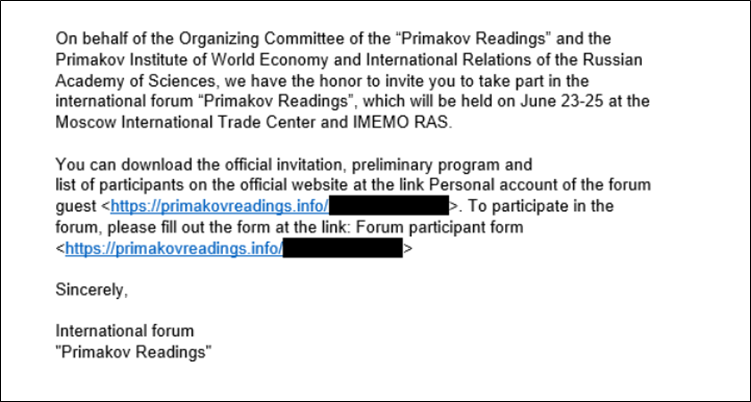
Security researchers from Kaspersky discovered this zero-day vulnerability as part of an advanced cyber-espionage campaign dubbed “Operation ForumTroll.” The attack campaign targeted media outlets, educational institutions, and government organizations in Russia through highly personalized phishing emails.

The exploit chain is particularly dangerous because it requires minimal user interaction. Victims only need to click on a malicious link in a phishing email, after which the attack executes automatically without any additional action from the user. Once triggered, the exploit allows attackers to escape Chrome’s sandbox environment, leading to remote code execution and possible system compromise.

CVE IDSystem AffectedVulnerability DetailsImpact
    CVE-2025-2783    Google Chrome (Windows)    Incorrect handle provided in Mojo, allowing sandbox escape  Remote code execution, System Compromise

Remediation:

  • Google Chrome Patch Released: Google has released security updates in Chrome versions 134.0.6998.177/.178 to address this vulnerability. Users should update immediately.

General Recommendations:

  • Enable Automatic Updates: Ensure automatic updates are enabled in Google Chrome and other Chromium-based browsers to receive future security patches promptly.
  • Phishing Awareness Training: Organizations should educate employees on identifying and avoiding phishing emails to prevent exploitation.
  • Endpoint Security Measures: Deploy endpoint detection and response (EDR) solutions to monitor and mitigate potential threats.
  • CISA Compliance for Federal Agencies: Federal agencies must adhere to CISA’s Binding Operational Directive (BOD) 22-01 to address known exploited vulnerabilities promptly.

Conclusion:

The exploitation of CVE-2025-2783 demonstrates the ongoing threat posed by sophisticated cyber-espionage activities.  Google has responded swiftly with a patch, and users are strongly advised to update their browsers immediately. Organizations should remain vigilant against phishing attempts and enhance their cybersecurity posture to mitigate similar threats in the future.

References:

Windows Zero-Day Exploit NTLM Hash Disclosure via Malicious Files

Summary

OEMMicrosoft
SeverityHigh
CVEsNot Yet Assigned
Exploited in WildNo
Patch/Remediation AvailableNo
Advisory Version1.0
Vulnerability Zero-Day

Overview

A newly discovered NTLM vulnerability in Windows, allows attackers to obtain login credentials when a user view a malicious file in Windows Explorer. This issue affects all Windows versions, from Windows 7 and Server 2008 R2 to the most recent Windows 11 v24H2 and Server 2025.

Attackers can exploit this flaw by using shared network folders, USB drives, or previously downloaded malicious files, making credential theft easy and difficult to detect.

Vulnerability NameCVE IDProduct AffectedSeverityFix
             NTLM Hash Disclosure Vulnerability      Not Yet Assigned    Windows OS and Windows Server         High  Unofficial micropatch available via 0patch

Technical Summary

This vulnerability enables attackers to steal NTLM authentication credentials simply by having users view a malicious file in Windows Explorer. Unlike previous NTLM relay attack techniques that required users to execute files, this exploit works just by rendering the malicious file’s metadata in the Windows Explorer preview pane. Attackers can leverage this method in various ways:

  • Hosting a shared network folder containing the malicious file.
  • Distributing infected USB drives that trigger the attack when inserted.
  • Tricking users into downloading the malicious file from a compromised or attacker-controlled website.

Once the credentials are captured, attackers can use NTLM relay attacks to gain unauthorized access to internal systems, escalate privileges, and move laterally across the network.

CVE IDSystem AffectedVulnerability Technical DetailsImpact
  Not Assigned Yet  Windows 7 – Windows 11 v24H2, Server 2008 R2 – Server 2025Attackers can capture NTLM credentials when users view malicious files in Windows Explorer. Exploitation methods include shared folders, USB drives, or downloads.Credential theft, network compromise, and potential lateral movement.  

Recommendations

  • Microsoft Patch Awaited: The vulnerability has been reported to Microsoft, and an official security update is expected in the near future.
  • Unofficial Micropatch Available: Security researchers at 0patch have released an unofficial micropatch that mitigates this issue. The micropatch is available for all affected Windows versions and will remain free until an official fix is provided by Microsoft.

Steps to Apply 0patch Micropatch:

  1. Create a free account on 0patch Central.
  2. Install and register the 0patch Agent on affected systems.
  3. The micropatch is applied automatically without requiring a system reboot.

Security Best Practices

  • Disable NTLM authentication where possible.
  • Implement SMB signing to prevent relay attacks.
  • Restrict access to public-facing servers like Exchange to limit credential relaying risks.
  • Educate users to avoid interacting with unknown or suspicious files in shared folders and USB drives.

Conclusion

Although not classified as critical, this NTLM credential theft vulnerability is extremely harmful due to its ease of exploitation. Attackers can exploit NTLM hashes in relay attacks to compromise internal network resources.

Security researchers confirm that comparable flaws have been actively exploited in real-world assaults. Until an official Microsoft patch is available, organizations should prioritize applying the 0patch micropatch and following NTLM security best practices to reduce potential risks.

References:

Scroll to top