Cyberthreat

Active Exploitation of Microsoft Outlook RCE Vulnerability (CVE-2024-21413) 

A critical remote code execution (RCE) vulnerability, CVE-2024-21413, affecting Microsoft Outlook has been actively exploited.

CISA has directed U.S. federal agencies to secure their systems against ongoing cyberattacks targeting this vulnerability, tracked as CVE-2024–21413. The flaw was originally discovered by Check Point vulnerability researcher Haifei Li and is a result of improper input validation when processing emails containing malicious links.

OEM Microsoft 
Severity Critical 
CVSS 9.8 
CVEs CVE-2024-21413 
Exploited in Wild Yes 
Patch/Remediation Available Yes 
Advisory Version 1.0 

Overview 

The flaw allows attackers to bypass security protections, leading to NTLM credential theft and arbitrary code execution. The vulnerability is critical, and Microsoft has released patches to mitigate the risk. 

Vulnerability Name CVE ID Product Affected Severity 
 Remote Code Execution Vulnerability  CVE-2024-21413  Microsoft  Critical 

Technical Summary 

The CVE-2024-21413 vulnerability arises due to improper input validation in Microsoft Outlook when handling emails containing malicious links. Exploitation of this flaw enables attackers to bypass Protected View, a security feature designed to prevent execution of harmful content embedded in Office files. 

By manipulating URLs with the file:// protocol and inserting an exclamation mark followed by arbitrary text, attackers can evade Outlook’s built-in security measures, tricking users into opening malicious Office files in editing mode instead of read-only mode. The Preview Pane also serves as an attack vector, enabling zero-click exploitation. Here is the POC also available for this vulnerabilty. 

CVE ID System Affected Vulnerability Details Impact 
CVE-2024-21413 Microsoft Office LTSC 2021, Microsoft 365 Apps, 
Microsoft Outlook 2016, Microsoft Office 2019   
Exploits improper input validation to bypass Outlook security protections using manipulated hyperlinks.  NTLM credential theft, remote code execution, potential full system compromise  

Remediation

  1. Apply Security Patches: Ensure that all the Microsoft Office products are updated with the latest security patches. 
  1. Disable NTLM Authentication: Where feasible, reduce reliance on NTLM authentication to prevent credential theft. 

General Remediation: 

  1. Monitor Network Activity: Watch unusual outbound connections to attacker-controlled servers. 
  1. User Awareness Training: Educate employees on recognizing phishing attempts and avoiding click on suspicious links or attachments. 
  1. Enable Advanced Threat Protection: Use security tools like Microsoft Defender to enhance security monitoring and detection. 
  1. Regularly Update Software: Maintain a routine patching schedule to ensure all systems are protected against known vulnerabilities. 
  1. Restrict Macros and External Content: Configure Microsoft Office to block macros and disable automatic external content execution. 

Conclusion: 

The exploitation of CVE-2024-21413 underscores the ongoing threat posed by improperly validated inputs in widely used enterprise software. With this vulnerability being actively exploited and the POC publicly available, organizations must prioritize patching, strengthen monitoring, and follow best security practices to minimize risks. CISA has included CVE-2024-21413 in its Known Exploited Vulnerabilities (KEV) catalog, emphasizing the need for immediate action. 

References: 
GitLab Releases Patch to Fix Critical and High-Severity Vulnerabilities 

GitLab releases fixes for vulnerabilities in patch releases. There are two types of patch releases: scheduled releases, and ad-hoc critical patches for high-severity vulnerabilities.

Summary 

OEM Gitlab 
Severity High 
CVEs CVE-2024-5655, CVE-2024-6385, CVE-2024-6678, CVE-2024-8970, CVE-2025-0194, CVE-2024-6324, CVE-2024-12431, CVE-2024-13041 
Exploited in Wild No 
Patch/Remediation Available Yes 
Advisory Version 1.0 

Overview 

The vulnerabilities could potentially impact unauthorized access, data manipulation, and service disruption. These have been disclosed through GitLab’s HackerOne bug bounty program. Latest Versions 17.7.1, 17.6.3, and 17.5.5 are now available for immediate download and upgrade to address these issues. 

Vulnerability Name CVE ID Product Affected Severity 
Import Functionality Vulnerabilities CVE-2024-6385 GitLab CE/EE Critical 
Import Functionality Vulnerabilities  CVE-2024-5655  GitLab CE/EE High 
Import Functionality Vulnerabilities CVE-2024-6678 GitLab CE/EE High 
Import Functionality Vulnerabilities CVE-2024-8970 GitLab CE/EE High 
Access Token Exposure in Logs CVE-2025-0194 GitLab CE/EE Medium 
Cyclic Reference of Epics Leading to DoS CVE-2024-6324 GitLab CE/EE Medium 
Unauthorized Manipulation of Issue Status CVE-2024-12431 GitLab CE/EE Medium 
Instance SAML Bypass CVE-2024-13041 GitLab CE/EE Medium 

Technical Summary 

This update addresses several significant vulnerabilities identified in GitLab CE/EE: 

CVE ID System Affected Vulnerability Details Impact 
CVE-2024-6385    GitLab CE/EE     Vulnerability in import functionality allowing potential exploitation     Allows attackers to exploit the system.  
CVE-2024-5655 
CVE-2024-6678 
CVE-2024-8970 
CVE-2025-0194 GitLab CE/EE Possible exposure of access tokens in logs under certain conditions. Potential unauthorized access to sensitive resources. 
CVE-2024-6324 GitLab CE/EE Cyclic references between epics could lead to resource exhaustion, causing a Denial of Service (DoS). Service disruption due to resource exhaustion. 
CVE-2024-12431 GitLab CE/EE Unauthorized users could manipulate issue statuses in public projects, potentially disrupting workflows. Workflow disruption and compromised data integrity. 
CVE-2024-13041 GitLab CE/EE Flaw in instance SAML configuration allowing bypass of external provider settings. Unauthorized access to internal projects or groups. 

Key Changes to Import Functionality: 

  • Post-import mapping: This new feature allows administrators to assign imported contributions and memberships to users after the import process is complete, enhancing control and security. 
  • Email-independent mapping: The updated mapping process no longer relies on email addresses, providing greater flexibility and security when importing from instances with different email domains. 
  • User control: Users on the destination instance now have the power to accept or reject assigned contributions, adding another layer of security and preventing unauthorized access. 

Remediation

  • Upgrade GitLab Instances: All users are strongly advised to upgrade to versions 17.7.1, 17.6.3, or 17.5.5 immediately to mitigate these vulnerabilities. 
  • Disable Importers Temporarily: Until upgrades are complete, disable importers to avoid exploitation. If import functionality is essential, enable it only during the import process and disable it afterward. 
  • Adopt Updated Features: Leverage the new post-import mapping, email-independent mapping, and user control enhancements for increased security.  

Conclusion: 

The vulnerabilities addressed in this patch release highlight the importance of timely updates and proactive security measures. GitLab’s redesign of its import functionality and the prompt patch release demonstrate a commitment to user security. Upgrading to the latest patched versions and adhering to the recommended actions is critical to maintaining a secure environment.  

References: 

Image 
 
A close-up of a warning sign

Description automatically generated 

Advisory on MUT-8694: Threat Actors Exploiting Developer Trust in Open-Source Libraries

MUT-8694: Threat Actors Exploiting Developer Trust in Open-Source Libraries

Overview

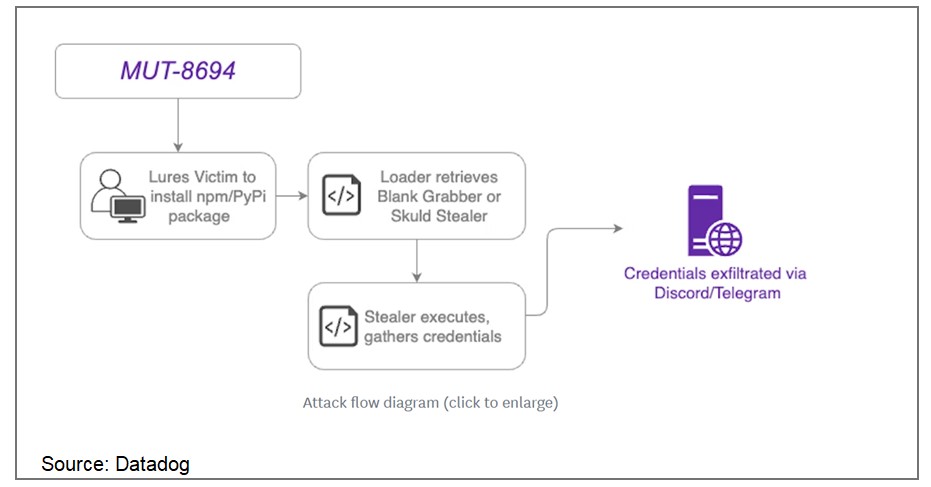
In November 2024, a supply chain attack designated as MUT-8694 was identified, targeting developers relying on npm and PyPI package repositories. This campaign exploits trust in open-source ecosystems, utilizing typosquatting to distribute malicious packages. The malware predominantly affects Windows users, delivering advanced infostealer payloads.

MUT-8694 Campaign Details

The threat actors behind MUT-8694 use malicious packages that mimic legitimate libraries to infiltrate developer environments. The campaign employs techniques such as:

  • Typosquatting: Using package names that closely resemble popular or legitimate libraries.
  • Payload Delivery: Embedded scripts download malware such as Blank Grabber and Skuld Stealer hosted on GitHub and repl.it.
  • Targeted Ecosystems: npm and PyPI, critical platforms for developers.

             Source: Datadog

Key Findings

One identified package, larpexodus (version 0.1), executed a PowerShell command to download and run a Windows PE32 binary from github[.]com/holdthaw/main/CBLines.exe. Analysis revealed the binary was an infostealer malware, Blank Grabber, compiled from an open-source project hosted on GitHub. Further inspection of the repository exposed another stealer, Skuld Stealer, indicating the involvement of multiple commodity malware samples.

Capabilities of Malware

The deployed malware variants include advanced features that allow:

  • Credential Harvesting: Exfiltrating usernames, passwords, and sensitive data.
  • Cryptocurrency Wallet Theft: Targeting and compromising crypto assets.
  • Application Data Exfiltration: Stealing configuration files from popular applications

Affected Packages

Some known malicious packages include:

  • larpexodus (PyPI): Executes a PowerShell script to download malware.
  • Impersonations of npm libraries: Host binaries leading to infostealer deployment.

Remediation:

To mitigate the risks associated with this attack, users should:

  • Audit Installed Packages: Use tools like npm audit or pip audit to identify vulnerabilities.
  • Validate Package Sources: Verify package publishers and cross-check names carefully before installation.
  • Monitor Network Activity: Look for unusual connections to GitHub or repl.it domains.
  • Use Security Tools: Implement solutions that detect malicious dependencies.

General Recommendations:

  • Avoid downloading software from unofficial or unverified sources.
  • Regularly update packages and dependencies to the latest versions.
  • Conduct periodic security awareness training for developers and IT teams.

References:

Scroll to top