Chrome Vulnerability

Chrome V8 Type Confusion Vulnerability Actively Exploited In The Wild 

Summary : Security advisory: Google has released an urgent security update to patch two high-severity Type Confusion vulnerabilities in the V8 JavaScript engine. The CVEs vulnerabilities are CVE-2025-13223, CVE-2025-13224 .

OEM Google 
Severity High 
CVSS Score 8.8 
CVEs CVE-2025-13223, CVE-2025-13224 
POC Available No 
Actively Exploited Yes 
Exploited in Wild Yes 
Advisory Version 1.0 

Overview 

One of these vulnerability (CVE-2025-13223) is already being actively exploited in the wild, allowing attackers to potentially execute arbitrary code through malicious web content. which attackers can bypass Chrome’s sandbox, steal sensitive data, or deploy malware. The fixes have been rolled out for Chrome Stable 142.0.7444.175/.176 across Windows, Mac, and Linux. 

Vulnerability Name CVE ID Product Affected Severity Fixed Version 
​Type Confusion Vulnerability in V8 JavaScript Engine CVE-2025-13223 Google Chrome High v142.0.7444.175 / v142.0.7444.176 
Type Confusion Vulnerability in V8 JavaScript Engine CVE-2025-13224 Google Chrome High v142.0.7444.175 / v142.0.7444.176 

Technical Summary 

Both vulnerabilities occur from Type Confusion vulnerabilities in Chrome’s V8 engine, where incorrect data-type handling leads to memory corruption and possible code execution. The CVE-2025-13223 is already being exploited in the wild and may involve APT-driven activity.

Another vulnerability was found internally through Google’s Big Sleep fuzzing system as part of ongoing proactive defense.

These weaknesses can allow attackers to bypass browser security boundaries and execute malicious actions remotely. Urgent need for users and administrators to apply Chrome’s latest security updates immediately. 

CVE ID System Affected  Vulnerability Details Impact 
CVE-2025-13223 Google Chrome (V8 Engine) Type confusion due to improper type handling in V8 allowing memory corruption.  Remote Code Execution, Sandbox Escape 
CVE-2025-13224 Google Chrome (V8 Engine) Type confusion triggered during script execution, discovered via fuzzing Remote Code Execution, Browser Crash 

Remediation

  • Immediate Action: Users and organization administrators should update Chrome immediately to the following patched versions: 
  • Windows: 142.0.7444.175 / 142.0.7444.176 
  • MacOS: 142.0.7444.176 
  • Linux: 142.0.7444.175 

Here are some recommendations below 

  • Enforce Chrome auto-updates on all endpoints via enterprise policies. 
  • Monitor browser crash logs and unusual behaviors tied to JavaScript execution. 
  • Run updated vulnerability & patch management tools to ensure full endpoint compliance. 
  • Educate users to avoid suspicious links and unknown websites during active exploitation events 

Conclusion: 
With Chrome being the most widely used browser globally, prompt updates are essential for the new security vulnerabilities. Maintaining browsers at the latest versions remains the strongest defenses against modern web-based attacks in modern cyber world. 

References

Chrome Latest Update Fixes Multiple High-Severity Security Flaws 

Summary : The recent Google Chrome update fixed several serious security issues that could let hackers take control of the browser or steal personal data. These vulnerabilities were mostly related to memory handling and scripting errors in important parts of Chrome like the JavaScript engine (V8) and browser interfaces.

OEM Google 
Severity High 
CVSS Score 8.8 
CVEs CVE-2025-12725, CVE-2025-12726, CVE-2025-12727, CVE-2025-12728, CVE-2025-12729 
POC Available No 
Actively Exploited No 
Exploited in Wild No 
Advisory Version 1.0 

Overview 

Problems like type confusion and memory misuse could allow attackers to run harmful code just by making users visit malicious websites. Some flaws also affected Chrome’s UI, media processing and extension systems exposing users to possible unauthorized access or data leaks. 

                Vulnerability Name CVE ID Product Affected Severity Fixed Version 
Out-of-Bounds Write in WebGPU  CVE-2025-12725 Chrome   High 142.0.7444.134/135 
Inappropriate Implementation in Views (UI Rendering)  CVE-2025-12726 Chrome  High 142.0.7444.134/135 
Inappropriate Memory Handling in V8 JavaScript Engine CVE-2025-12727 Chrome  High 142.0.7444.134/135 
Inappropriate Implementation in Omnibox (Unified Search Bar) CVE-2025-12728 Chrome  Medium 142.0.7444.134/135 
Inappropriate Implementation in Omnibox (Unified Search Bar) CVE-2025-12729 Chrome  Medium 142.0.7444.134/135 

Technical Summary 

The bugs included memory corruption issues such as out-of-bound writings and use-after-free errors, which can lead to unpredictable behavior and remote code execution (RCE).

The JavaScript engine vulnerabilities involved mishandling data types or incorrect implementation, enabling attackers to break security boundaries.

Other issues involved UI security logic problems that could mislead users or weaken protections. Google patched all these weaknesses by tightening input validations, fixing memory lifecycle bugs, correcting UI behavior and strengthening internal security checks. 

CVE ID Component Affected  Vulnerability Details Impact 
 CVE-2025-12725 Google Chrome (WebGPU) Out-of-bounds write in WebGPU due to improper bounds checking, allowing attackers to overwrite memory beyond allocated limits.  Remote Code Execution / Browser Crash 
 CVE-2025-12726 Google Chrome (Views UI) Inappropriate implementation in the Views component causing memory corruption. UI rendering 
CVE-2025-12727 Google Chrome (V8 Engine) Improper handling in the V8 JavaScript engine enabling potential arbitrary code execution through crafted scripts. Remote Code Execution  
CVE-2025-12728 Google Chrome (Omnibox) Flaws in Omnibox’s implementation could allow UI spoofing or navigation bar manipulation. UI Spoofing  
CVE-2025-12729 Google Chrome (Omnibox) Similar flaws in Omnibox affecting input validation, leading to potential security bypasses or deceptive UI. UI Spoofing / Security Bypass 

Recommendations 

Update Chrome immediately to the following versions: 

  • For windows 142.0.7444.134/.135  
  • For MacOS 142.0.7444.135 
  • For Linux 142.0.7444.134 

You can update by Open Chrome Settings → Help → About Google Chrome, then allow Chrome to check for and install updates immediately. 

Along with update you can follow the recommendations below as well 

  • Enforce Chrome auto-updates across managed endpoints using enterprise policy controls. 
  • Actively monitor browser crash reports or any suspicious logs potentially linked to exploit attempts. 
  • Use vulnerability & patch management tools to ensure all endpoints are running the latest version of all applications.  

Conclusion: 
The Chrome security flaws can compromise devices just through browsing. Because millions use Chrome daily, these gaps were a high risk and google already patched those issues. Keeping any application to the latest version which is the best defense against cyber threats aiming at browsers. 

References

Critical Chrome Use-After-Free Vulnerability in ANGLE Graphics Library 

Security Advisory: A critical use-after-free vulnerability has been identified in the ANGLE graphics library used by Google Chrome which enables applications designed for OpenGL ES (OpenGL used on mobile and embedded devices) or WebGL (a web-based 3D graphics API) to run on platforms that primarily use other graphics APIs, such as DirectX on Windows or Vulkan on Android.

OEM Google Chrome 
Severity High 
CVSS Score 8.8 
CVEs CVE-2025-9478 
POC Available No 
Actively Exploited No 
Exploited in Wild No 
Advisory Version 1.0 

Overview 

This vulnerability could allow attackers to take control of your device simply by visiting a harmful website using HTML or WebGL which is just opening the wrong page could let hackers run their own code on our system. 

Google has already fixed this problem in the latest Chrome update (version 139.0.7258.154/.155 for Windows & macOS and 139.0.7258.154 for Linux). Users and administrators are strongly advised to apply the latest updates immediately. 

Vulnerability Name CVE ID Product Affected Severity Fixed Version 
​ Use-After-Free Vulnerability in ANGLE  CVE-2025- 9478 Google Chrome  High  v139.0.7258.154/.155 (Win/Mac), v139.0.7258.154 (Linux) 

Technical Summary 

This security issue happens when Chrome accidentally reuses computer memory that should no longer be in use. This is exploited by the attacker, if we visit a harmful website designed by cybercriminals, it can secretly run special graphics commands (through WebGL or Canvas). This could corrupt our system’s memory, crash our browser, or allow hackers to run their own code on our device remotely. 

CVE ID System Affected  Vulnerability Details Impact 
 CVE-2025- 9478 Chrome < 139.0.7258.154 A Vulnerability in Chrome’s graphics engine lets attackers reuse cleared memory through specially designed HTML/WebGL input. Remote code execution,  
Data theft  
 

Remediation

  • Update to Chrome latest versions 139.0.7258.154/.155 on Windows/macOS or 139.0.7258.154 on Linux or the later one. 

Here are some recommendations below 

  • Keep monitoring the logs for suspicious activities unusual WebGL or graphics API call. 
  • Conduct user awareness training to educate users about the risks of malicious websites, avoiding unknown links. 

Conclusion: 
This is a high-severity Chrome vulnerability that could allow remote code execution via malicious WebGL content. Although not yet exploited in the wild but immediate patching is essential. Users should update Chrome, monitor unusual graphics activity and stay informed about malicious website risks to ensure strong browser security. 

References

Critical Chrome Vulnerability (CVE-2025-2783) Exploited in Cyber-Espionage Campaign

OEMGoogle Chrome
SeverityHigh
CVSS8.3
CVEsCVE-2025-2783
Exploited in WildYes
Patch/Remediation AvailableYes
Advisory Version1.0

Overview

The Cybersecurity and Infrastructure Security Agency (CISA) has issued an urgent advisory regarding the critical zero-day vulnerability, CVE-2025-2783, in Google Chrome and other Chromium-based browsers on Windows. This vulnerability is actively exploited in the wild and has been added to CISA’s Known Exploited Vulnerabilities (KEV) catalog, urged immediate patching to prevent security breaches and unauthorized system access.

Vulnerability NameCVE IDProduct AffectedSeverityFixed Version
  Google Chromium Mojo Sandbox Escape Vulnerability  CVE-2025-2783  Google Chrome  High  134.0.6998.117/.118

Technical Summary

This high-severity vulnerability found in the Mojo framework of Chromium-based browsers including Google Chrome, Microsoft Edge, and Opera, Brave etc. The vulnerability originates from a logic error that results in an incorrect handle being provided under certain conditions. This flaw allows attackers to bypass Chrome’s sandbox protections and potentially execute arbitrary code on the affected system.

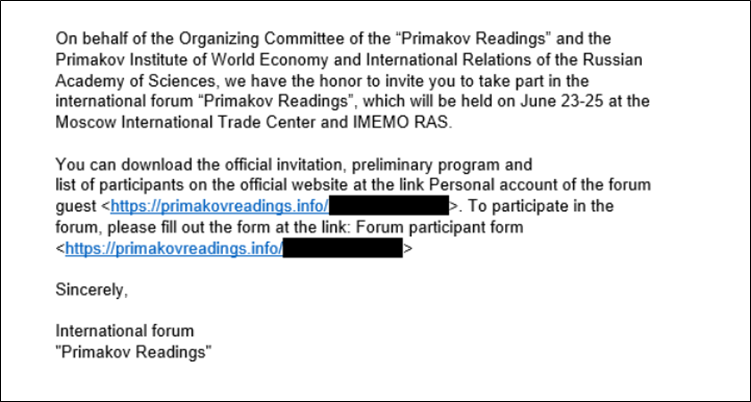
Security researchers from Kaspersky discovered this zero-day vulnerability as part of an advanced cyber-espionage campaign dubbed “Operation ForumTroll.” The attack campaign targeted media outlets, educational institutions, and government organizations in Russia through highly personalized phishing emails.

The exploit chain is particularly dangerous because it requires minimal user interaction. Victims only need to click on a malicious link in a phishing email, after which the attack executes automatically without any additional action from the user. Once triggered, the exploit allows attackers to escape Chrome’s sandbox environment, leading to remote code execution and possible system compromise.

CVE IDSystem AffectedVulnerability DetailsImpact
    CVE-2025-2783    Google Chrome (Windows)    Incorrect handle provided in Mojo, allowing sandbox escape  Remote code execution, System Compromise

Remediation:

  • Google Chrome Patch Released: Google has released security updates in Chrome versions 134.0.6998.177/.178 to address this vulnerability. Users should update immediately.

General Recommendations:

  • Enable Automatic Updates: Ensure automatic updates are enabled in Google Chrome and other Chromium-based browsers to receive future security patches promptly.
  • Phishing Awareness Training: Organizations should educate employees on identifying and avoiding phishing emails to prevent exploitation.
  • Endpoint Security Measures: Deploy endpoint detection and response (EDR) solutions to monitor and mitigate potential threats.
  • CISA Compliance for Federal Agencies: Federal agencies must adhere to CISA’s Binding Operational Directive (BOD) 22-01 to address known exploited vulnerabilities promptly.

Conclusion:

The exploitation of CVE-2025-2783 demonstrates the ongoing threat posed by sophisticated cyber-espionage activities.  Google has responded swiftly with a patch, and users are strongly advised to update their browsers immediately. Organizations should remain vigilant against phishing attempts and enhance their cybersecurity posture to mitigate similar threats in the future.

References:

Scroll to top